Get to Know the General
When people are just getting started with Civil 3D, they often are confused. The menus are short compared to Land Desktop and they just can't find stuff. So here is someone that can help!
 General Toolspace at your command!
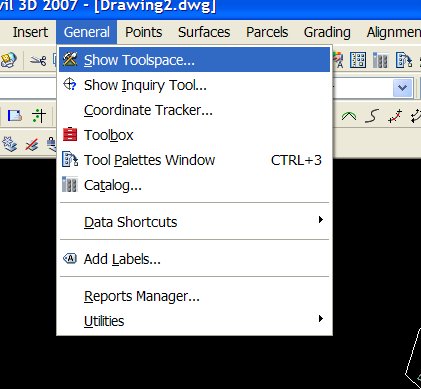
You can find General Toolspace under General>Show Toolspace
General Toolspace at your command!
You can find General Toolspace under General>Show Toolspace
 The Toolspace has two tabs:
PROSPECTOR- He's always looking for your Civil 3D Gems!
The Toolspace has two tabs:
PROSPECTOR- He's always looking for your Civil 3D Gems!
 The Prospector tab is a Window's Explorer type interface that keeps all of your Civil 3D Objects (gems) close at hand.
It is similar to terrain model explorer from Land Desktop- only it is the EVERYTHING explorer.
From the Prospector you can edit object properties, creat new properties, and many more tasks.
When in doubt, right click on something in Prospector!
SETTINGS- How do you make those Civil 3D Gems Shine?!
The Prospector tab is a Window's Explorer type interface that keeps all of your Civil 3D Objects (gems) close at hand.
It is similar to terrain model explorer from Land Desktop- only it is the EVERYTHING explorer.
From the Prospector you can edit object properties, creat new properties, and many more tasks.
When in doubt, right click on something in Prospector!
SETTINGS- How do you make those Civil 3D Gems Shine?!
 Every diamond needs a nice setting.
Every Civil 3D object needs a STYLE and LABEL STYLES.
The Settings Tab stores all of your Civil 3D Styles- aka "How Things Look, How things are Labeled, How Commands Run" and other goodies like Pipe Catalogs, etc.
This tab is what your Civil 3D.dwt brings in.
If you don't start from a template, it would be like presenting your fiancee with a gold ore and a raw diamond. The material is there, but it looks like a pile of rocks instead of an engagement ring.
Every diamond needs a nice setting.
Every Civil 3D object needs a STYLE and LABEL STYLES.
The Settings Tab stores all of your Civil 3D Styles- aka "How Things Look, How things are Labeled, How Commands Run" and other goodies like Pipe Catalogs, etc.
This tab is what your Civil 3D.dwt brings in.
If you don't start from a template, it would be like presenting your fiancee with a gold ore and a raw diamond. The material is there, but it looks like a pile of rocks instead of an engagement ring.
posted by Dana @ 5/01/2006 08:44:00 PM
0 comments


0 Comments:
Post a Comment
<< Home